Ship features with AI —
without giving up the decisions.
sdd is a spec-driven development framework: a gated pipeline — spec → plan → build → review → ship — that you drive from a terminal, or hand off to a headless runner that collaborates with you through ticket comments.
The idea
Gate the decisions, automate the mechanics. You gate the high-judgment steps — is the spec right? is the plan sound? — and anything irreversible (branch, PR, merge). The mechanical loop — write code, run the tests, read the failure, fix — runs autonomously, bounded by a max iteration count.
Each step writes a real file the next one reads: spec.md → plan.md →
the diff → review.md. The artifact chain is the message bus, not
a long, degrading AI conversation. That's what keeps every stage's context small, fresh, and
checkable — and what makes the pipeline restartable at any gate.
You stay in control
Every stage stops for your approval. Builds branch off your trunk first, never commit, and never merge.
A panel, not one voice
Product, UX, security — plus your domain experts (medical, fintech…) — raise questions at the spec gate and findings at review. They surface; they never assert.
Trust through tests
The build loop proves its work against your real test suite; review findings are adversarially verified before you see them.
Install
Requires Node ≥ 18 and pnpm. The AI stages reuse your existing Claude Code login (no API key needed).
git clone git@github.com:timriley-io/spec-driven-development.git
cd spec-driven-development
pnpm install

# add an `sdd` command to your shell (run from the repo root)
printf '\nsdd() { local d="$PWD"; (cd %q && pnpm --silent sdd --root "$d" "$@"); }\n' "$PWD" >> ~/.zshrc
source ~/.zshrc
Bash users: append to ~/.bashrc instead. It's a shell function (not
an alias) so subcommands and quoted arguments forward correctly.
The everyday loop
# from your project directory:
sdd                          # bootstrap once; after that, a bare `sdd` is a live navigator
sdd spec "add CSV export"    # draft the spec — experts weigh in, you answer its questions
sdd plan csv-export          # decompose into an ordered task list
sdd build csv-export         # implement + run tests on an sdd/<slug> branch
sdd review csv-export        # multi-lens review of the diff against the spec
Or the whole pipeline in one shot: sdd feature "add CSV export". And you don't
have to remember any of these commands — a bare sdd drops you into a
live navigator.
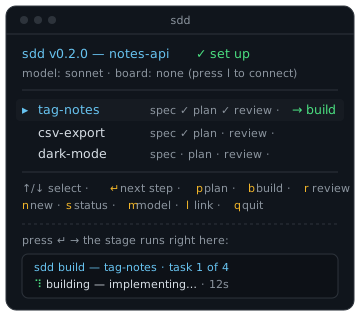
sdd in a set-up repo — pick a feature, press ↵, and the
next stage runs right there. No re-typing commands.Guided, not just gated. Questions come with suggested answers (pick with a
digit or type your own); your answers stay on screen as a transcript you can step back through
with esc; every AI wait shows a live spinner + elapsed time and the
model it's using; and the write gate previews the actual artifact, syntax-coloured, with a
clickable path. See how it works →
Model / cost: the AI stages inherit your Claude Code model; pick one at
setup or prefix any command with SDD_MODEL=sonnet for a cheaper run — either way
it's shown in each command's preamble. sdd --verbose narrates what's happening;
sdd --version tells you what you're on.
Scale it up when you're ready
The board runner
File one-line tickets. A laptop runner drafts the spec, asks its questions on the ticket, refines from your reply, builds, and opens the PR — you just approve at the gates.
MULTI-REPOProducts, not just repos
An API + a web client, one product: one spec grounded across the parts, plans decomposed per part, and builds that fan out a PR into each repo.
DESIGNHow it works
Two layers, an expert panel, gate labels as the source of truth, and safety by containment — the architecture in five minutes.