A single-repo feature, end to end
The everyday loop — bootstrap once, then take a feature from idea to reviewed diff. This is the walkthrough to do first: it shows you where every gate is.
0 Bootstrap the project (once)
cd ~/code/notes-api
sdd
sdd setup runs three evidence-based passes and stops at a review gate
(↵ to write, q to abort):
- Operational — detects your stack and the
test/build/lint/typecheckcommands, and actually runs the safe ones to record a real green/red baseline. - Purpose — drafts
PRODUCT.mdfrom the code, then asks you the 3–5 sharpest questions to correct it (a greenfield repo gets interviewed instead — what it is, who it's for, the first feature). Inference is a correction, never a fact. - Process — infers how you ship (branching, merge style, feature flags) or proposes editable defaults.
- Domain experts — a checklist of advisors (medical, fintech, privacy…) to convene at the spec + review gates, seeded from your code. Toggle the ones that fit.
It writes CLAUDE.md (an sdd-framework block),
PRODUCT.md, and .sdd/config.json (recording the model and your
expert roster) — all committed, all safe to hand-edit. Re-running never clobbers your edits.
From now on, a bare sdd drops you into a live navigator instead
of re-running setup — arrow through your features and run each one's next stage inline:
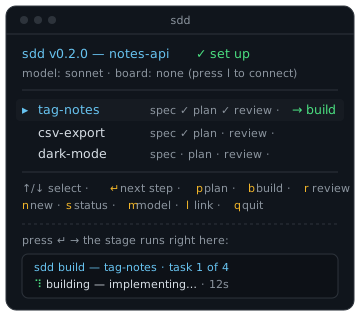
sdd once you're set up — pick a feature, press ↵, the stage runs right there.1 Spec — describe what, get interrogated
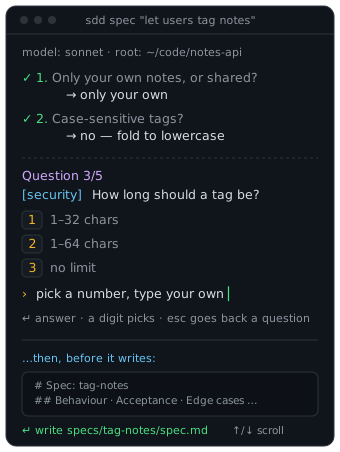
sdd spec "let users tag notes and filter by tag"The agent drafts the spec, then the expert panel (product, UX, security + any domain experts in your roster) and the draft's own questions are put to you one at a time — each with a few suggested answers you can pick with a digit or type over. Answered questions stay on screen as a transcript:
model: sonnet · root: ~/code/notes-api

✓ 1. Only your own notes, or shared?
     → only your own

Question 2/5
[security] How long should a tag be?
  1 1–32 chars   2 1–64 chars   3 no limit
› pick a number, type your own_
↵ answer · a digit picks · esc goes back a question
Nothing is written blind: at the gate sdd previews the actual spec
(scrollable) with a clickable path — not a character count — then on ↵ writes
specs/tag-notes/spec.md: summary, behaviour & acceptance criteria, edge
cases, non-goals, open questions.
Starting from an empty repo? The very first question is which
platform/stack to build on, and plan task 1 scaffolds the project — so
build always has real files to change.
2 Plan — decompose into tasks
sdd plan tag-notesReads the spec and drafts plan.md as an ordered task list —
each task a ### N. heading with what / which files / how to verify, and
every task changes code (no "confirm" or "research" filler). The plan
is the decomposition; there's no separate "break it down" step. Same guided flow —
but the plan's questions are strictly about implementation, sequencing, and
technology; it never re-asks what the spec already settled.
3 Build — implement + verify, safely
sdd build tag-notes # task 1; --task N for one, --all for the restmodel: sonnet · root: ~/code/notes-api
sdd build — tag-notes · task 1 of 4
→ on branch sdd/tag-notes (moved off the trunk before editing)
· implementing (attempt 1)
· verifying
✓ implemented and verified (1 attempt)
tag.ts | 14 ++++++++++
Next: sdd build tag-notes --task 2The header says task N of M so you know how far through the plan you are;
--all works through the remaining tasks in one go, and each finishes with a
Next: line. Three safety properties are working for you:
- On a trunk branch it moves to
sdd/tag-notesfirst — yourmainstays clean (--no-branchopts out). - The agent edits files but cannot run shell commands — the CLI runs your test suite itself and feeds failures back into the bounded fix loop.
- Build never commits, and a task that changes nothing is a loud
⚠ warning, never a false✓. You own the diff.
4 Review — a second pair of eyes
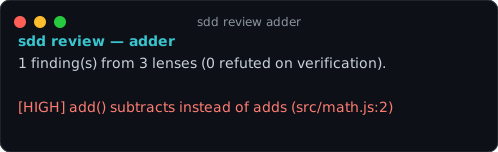
sdd review tag-notessdd review — tag-notes
3 finding(s) from 6 lenses (1 refuted on verification).
[HIGH] Tag filter is not scoped to the current user (tag.ts:22)
[MED] Empty-tag input creates a blank tag (tag.ts:8)Every lens reviews the diff independently against the spec; findings are merged, deduped,
and adversarially verified — a skeptic pass drops what it can refute, so
what reaches you is worth your time. Findings land in
specs/tag-notes/review.md; add --comment (and optionally
--pr N) to post them on a PR instead.
5 Ship
Review the diff, commit, open your PR, merge. sdd gates the decisions — the merge is always
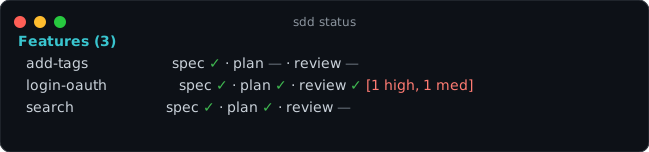
your gesture. sdd status shows every feature's position at any time:
The one-shot version
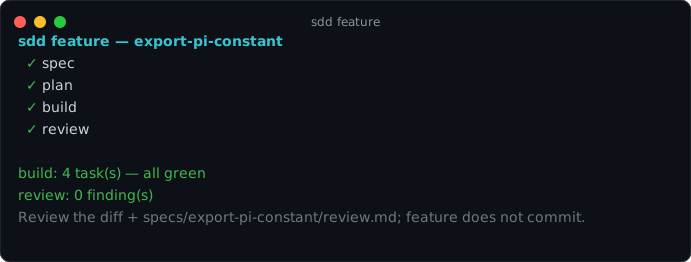
sdd feature "let users tag notes and filter by tag"Chains spec → plan → build (all tasks) → review, branching first, and prints each stage's
result. Use the step-by-step loop above while you're calibrating trust; switch to
sdd feature once you have.