How it works
The architecture in five minutes — enough to predict what the tool will do before you run it.
Artifacts are the message bus
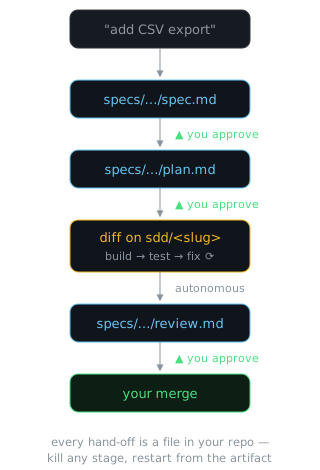
Most AI coding fails the same way: one long conversation that slowly degrades. sdd avoids that structurally — each stage reads a small, real file and writes another.
The files live in specs/<feature>/, committed and human-editable, and
they're the only context hand-off between stages. That keeps every stage's
context small and fresh — and makes the pipeline restartable at any gate.
Two layers
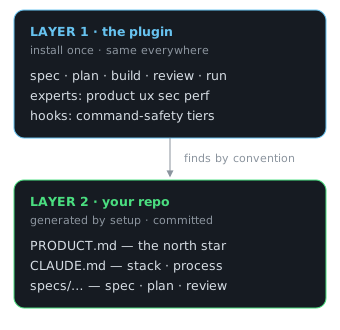
Generic behaviour is kept strictly apart from project knowledge, so every agent's context
stays lean. The plugin ships the pipeline; sdd setup generates your project's
layer from evidence — it detects the stack, actually runs the safe commands for a
real baseline, drafts PRODUCT.md from the code, then asks you the
3–5 sharpest questions to correct it.
Inference is presented as a correction, never as fact.
Guided, not just gated
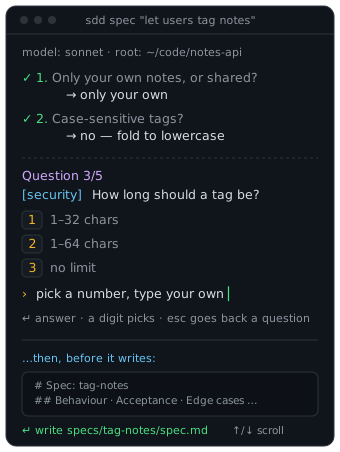
Gating the decisions only helps if the tool makes each decision easy. So every AI stage opens with a one-line preamble — which model it's running and which project root — then interrogates you one question at a time, each with 2–3 suggested answers you can pick with a digit or override with your own.
Answered questions stay on screen as a transcript; press
esc to step back and revise one. Every wait on the model shows a
live spinner and elapsed time (never a dead "drafting…"), and nothing is
written blind — the gate previews the actual artifact, syntax-coloured and
scrollable, with a clickable path. Every command ends with a Next: line, so you
always know the move.
Greenfield-aware. On an empty repo the spec asks which
platform/stack to build on (with suggestions), and plan task 1 scaffolds the
project — so build always has real files to change.
A live navigator, not a wall of commands
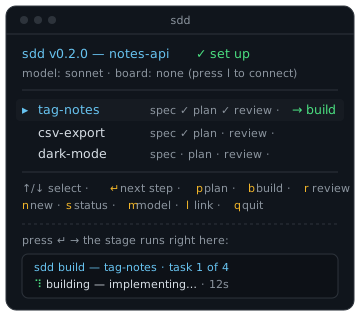
Run sdd in a set-up repo and you land in a keyboard-driven
navigator — not a re-run of setup. It lists every feature with its position in the
pipeline and the recommended next stage; arrow to one and press
↵ to run that stage inline, then land right back on the list. No
re-typing sdd plan … — just p/b/r to run
a stage, n for a new feature, m to switch model, l to
connect a board.
Piped or in CI it prints a static summary instead; sdd help lists every command,
and sdd --version tells you what you're running.
Experts: perspectives, not stages
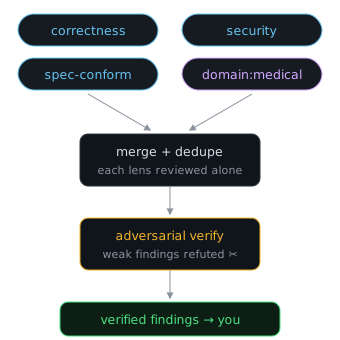
Experts are lenses convened in parallel at the two gates where diverse perspective pays off: at the spec gate they raise their sharpest questions (which you answer); at the review gate each reviews the diff independently, findings are merged, and a skeptic pass refutes the weak ones before anything reaches you.
Domain experts are personas, not credentials. A medical
expert surfaces considerations for a qualified human, grounded in your
PRODUCT.md invariants — it never asserts domain facts from model memory.
The board: labels are the truth
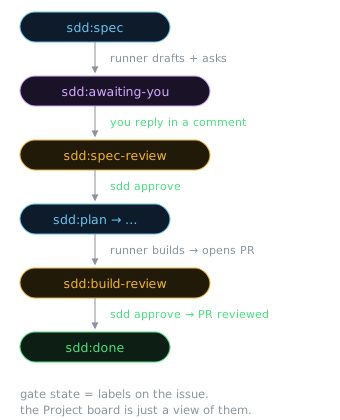
For the autonomous workflow, gate state lives as labels on GitHub issues.
The runner polls for actionable labels and does the stage's work; you advance gates by
relabelling — which is all sdd approve and sdd bounce do.
The ticket's comment thread is the conversation: the runner drafts, posts
its open questions, parks under sdd:awaiting-you, and refines from your reply
on the next poll — idempotently. The optional GitHub Project is an aggregating
view, never a second source of truth.
Safety by containment, not trust
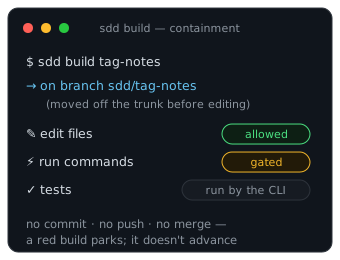
Builds branch off your trunk first (the runner uses an isolated worktree
per ticket). The build agent edits files but cannot run commands — the CLI
runs your tests and feeds failures back into the bounded fix loop. A
PreToolUse hook auto-approves read-only commands and routes anything
outward-facing to a human prompt.
Nothing merges itself, a red build parks instead of advancing, and ship is your gesture — always.
Multi-repo products
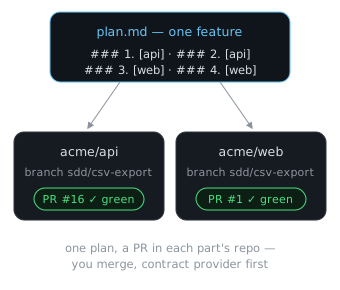
One product spanning several repos gets a thin product layer: a registry
of parts with a shared PRODUCT.md. Specs declare
## Touchpoints, plans decompose into per-part task groups, and the build
fans out — a branch and PR in each part's repo.
Walkthrough →
Deeper design notes
Each piece has a full design note in the repo: agents · experts · tracking · orchestration · ticket-dialogue · execution-safety · multi-repo